Withdrawal requests are processed on the same (or next available) business day. Once the withdrawal is processed and marked as ‘Done,’ it may take up to 2 working days for the funds to reach your bank account, it mostly depends on the bank/payment provider.
Withdrawals to newly added bank accounts require additional verification. If you have any questions about withdrawals, contact our Client Support team.
PeerBerry does not apply any service, deposit, or withdrawal fee.
The maximum limit per withdrawal transaction on PeerBerry is 15 000 Eur (if you need to withdraw a higher amount, you can initiate multiple transactions).
The minimum withdrawal amount should be not less than 1 Eur.
Funds withdrawal can be made to the bank account from which the deposit was made.
How to add a new bank account for money withdrawal?
In order to add a new bank/payment provider account to which you want to withdraw your money, you have to transfer at least 0.01 Eur from your new account to your PeerBerry account. All bank/payment provider accounts used to transfer money to PeerBerry will be registered on your profile, and you will be able to choose from any of these accounts when requesting a withdrawal.
If you would need any of the assigned bank accounts to be removed from your profile, please reach out to our Customer Support.
You are able to withdraw your inactive funds (funds not assigned to an active contract) that are listed in your investor profile as ‘Available funds’. As the User Agreement states, the main currency of operations on the platform is Euro, withdrawals also can be requested only in Euros.
We work with SEPA (Single Euro Payments Area) transfers in Euro currency only. If your bank is not a SEPA participant, you may use a banking service provider such as Revolut, N26, Wise, or another equivalent provider to complete your withdrawal.
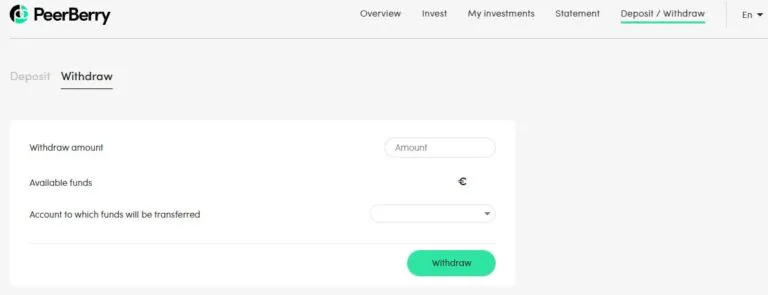
To withdraw your inactive funds you have to go to the ‘Deposit/Withdraw’ -> ‘Withdraw’ section on your profile, insert the required amount to be withdrawn, select your bank account to which funds will be transferred, and confirm the request by pressing ‘Withdraw’:
Important: Each withdrawal request must be confirmed by the verification code sent to the investor’s email. The withdrawal request will be automatically canceled if the investor does not confirm the withdrawal within one hour or fails to enter the withdrawal confirmation code correctly several times.
A notarized copy of the inheritance document (or certificate of inheritance) in English.
A copy of the heir’s valid ID.
Step 2. If there is more than one heir
If there are multiple heirs, either:
All heirs submit a joint request; or
One heir submits the request together with notarized powers of attorney from the other heirs. In this case, we transfer the funds in a single payment to the authorized heir.
Step 3. Identity verification
Before we can release any funds, we will:
Verify the heir’s identity.
Verify the recipient’s bank account.
Confirm that the recipient matches the person named in the inheritance documents.
Step 4. Payment
Once the documents have been approved, we will:
Close access to the investor’s PeerBerry profile.
Calculate the amount due, including the invested principal, accrued interest, and any other payable amounts.
Transfer the funds to the heir’s bank account in accordance with the steps above.
If you have any questions about withdrawing the inherited funds or the required documents, please contact our support team at [email protected].