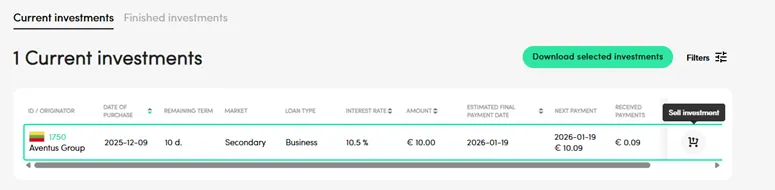
Open ‘My investments’ -> ‘Current investments’ on your account, choose the investment you want to sell, and press the icon ‘Sell investment’:
Then set the preferred sale price (investments can be sold at the current/remaining value or with a discount of up to 50% ), and the calculator will show the amount you will receive after the sale, and the buyer‘s predictable earnings. ‘Seller earnings’ indicate the investor’s (seller’s) earnings gained throughout the investment period up to date.
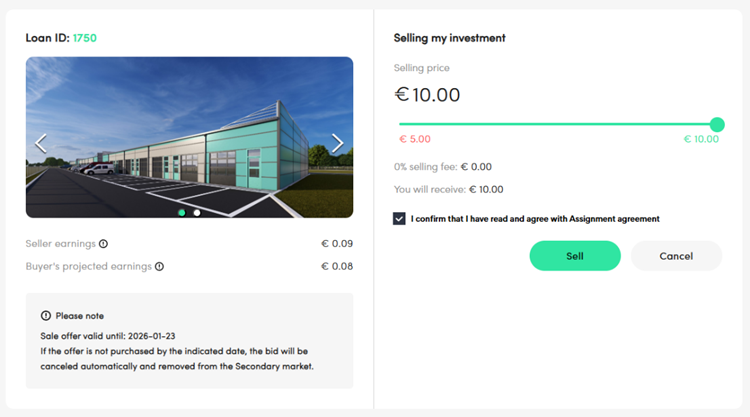
By pressing ‘Sell’, you will confirm and share your sale offer on the platform’s secondary market (the offer will be active for 14 calendar days; if the investment is not purchased over this period, the offer will be automatically canceled).
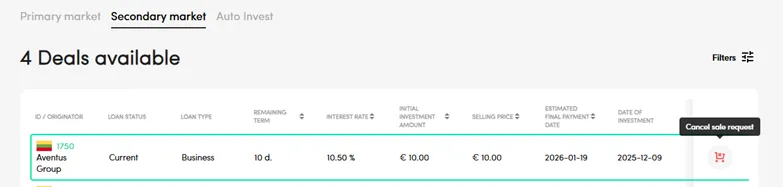
If you have changed your mind, you can cancel the sale offer at any time until it is purchased by another investor. To cancel, go to ‘My investments’ -> ‘Funded projects’, and press on the red icon ‘Cancel sale request’:
After a successful sale, your investment will be moved to the ‘My investments’ -> ‘Finished investments’ section.
Important to note:


